Process Management
This blog will discuss process creation and termination from the programmer’s point of view.
Process creation
Init is the first process that gets spawned during the boot process and this process gets process Id 1. All the other processes are created using a system call called, fork().
The process which calls the fork is called the parent process and the process which gets created as a result of the fork call is called a child process. A child process will get the parent process Id (PPID) that of the parent process which created it.
A new task_struct data structure gets created, every time a new process gets created. The memory requirements are handled by the SLAB cache.
Let’s see how a process is created.

A parent process calls fork() system call.
The fork() call is intercepted in ‘./kernel/fork.c’ and calls kernel_clone(). The later takes a parameter called flags. Flags help decide which resources can be shared between the child and the parent process.
flags have been explained later in this blog.
In kernel_clone(), a call to copy_process() creates a new process( say p), but not activated or scheduled yet. This step involves copying the relevant resources as per the flags defined.
Process ‘p’ is scheduled and it starts running.
Different flags that decide how the child process will be created as below:
| CLONE_VM | Parent and Child share address space |
| CLONE_FILES | Parent and Child share open files |
| CLONE_FS | Parent and Child share file system information |
| CLONE_SIGHAND | Parent and Child share the signal handlers and blocked signals |
| CLONE_PIDFD | If pidfd of the child should be placed in the parent process |
| CLONE_PTRACE | Continue tracing the child too |
| CLONE_VFORK | Used when vfork() is used instead of the fork(). Parent process will be forced to sleep until the child process returns |
| CLONE_PARENT | Child enforces to have the same parent which created it |
| CLONE_THREAD | Parent and child are in the same thread group |
| CLONE_NEWNS | Create a new namespace for the child process |
| CLONE_SYSVSEM | Parent and child share the system-V semantics |
| CLONE_SETTLS | Create a new TLS for the child process |
| CLONE_PARENT_SETTID | Set the TID in the parent |
| CLONE_CHILD_CLEARTID | Clear the TID in the child |
| CLONE_CHILD_SETTID | Set the TID of the child |
| CLONE_DETACHED | Detach and ignore the child process |
| CLONE_UNTRACED | Ignore the CLONE_PTRACE on the child |
| CLONE_NEWCGROUP | Create a new cgroup namespace |
| CLONE_NEWUTS | Create a new utsname namespace |
| CLONE_NEWIPC | Create a new ipc namespace |
| CLONE_NEWUSER | Create a new user namespace |
| CLONE_NEWPID | Create a new pid namespace |
| CLONE_NEWNET | Create a new network namespace |
| CLONE_IO | Clone the IO context |
copy_process()
Make a call to dup_task_struct(), which creates a new kernel stack, thread_info and task_struct structure for the new process. The new values are identical to those of the current task. At this point, the child and parent process descriptors are identical.
It then checks that the new child will not exceed the resource limits on the number of processes for the current user.
The child needs to differentiate itself from the parent. Various members of the process descriptor are cleared or set to initial values. Members of the process descriptor not inherited are primarily statistically information. The bulk of the values in task_struct remain unchanged.
The child’s state is set to TASK_UNINTERRUPTIBLE to ensure that it does not yet run.
copy_process() calls copy_flags() to update the flags member of he task_struct.
It calls alloc_pid() to assign an available PID to the new task.
Depending on the flags passed to kernel_clone(), copy_process() either duplicates or shares open files, filesystem information, signal handlers, process address space and namespace. These resources are typically shared between threads in the same process, otherwise they are unique and thus copied here.
Finally, copy_process() cleans up and returns to the caller a pointer to the new child.
Process states
Each process goes through the below states, through its life time.
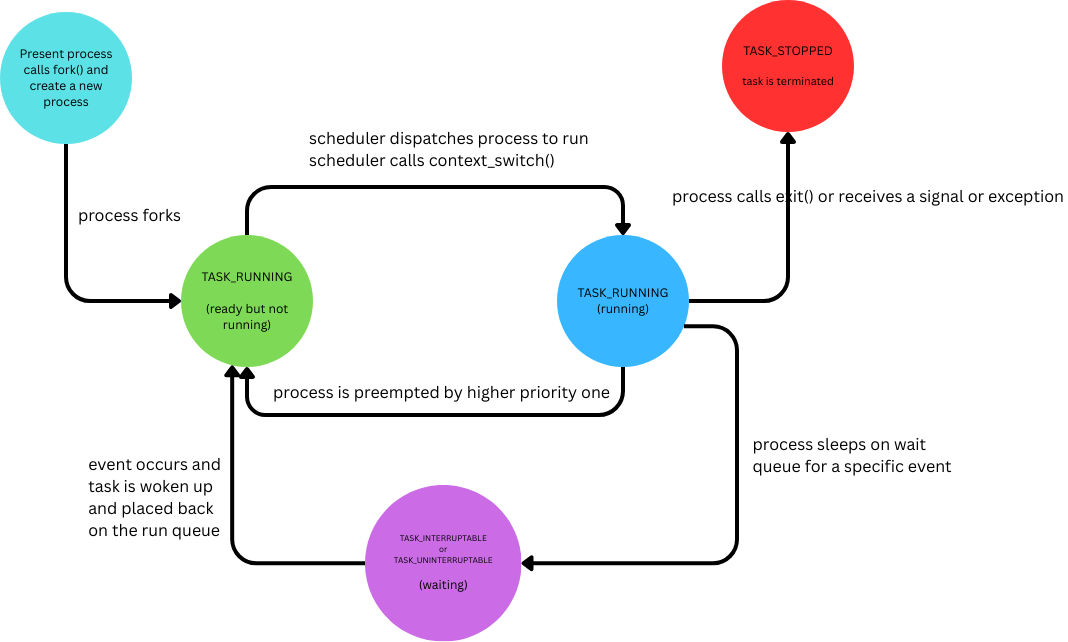
When the process gets created, it gets the TASK_RUNNING(ready) status. In this state, the process is ready to be run by the scheduler.
Once the scheduler puts the process to run, its state is moved to TASK_RUNNING(running) status.
When the process is pre-emptied by the scheduler for another higher priority one, it moves back from TASK_RUNNING(running) to TASK_RUNNING(ready) state.
When a process waits for any event(like IO), its moved to TASK_INTERRUPTABLE(waiting) state.
When the event is full-filled, the process is moved back to TASK_RUNNING(ready) state.
When a process calls exit() or receives any signal or exception, it is moved to TASK_STOPPPED state and is terminated.
Process address space
Linux is a virtual memory operating system, meaning the physical memory is virtualized for each process. Meaning, each process’s view of memory is as if it has the entire physical memory to access.
The process address space consists of the virtual memory addressable by a process and the address within the virtual memory that the process is allowed to use. Each process is given a flat 32-bit or 64-bit address space, with the size dependent on the architecture.
A memory address is a given value in the given address space, 0X5012E300. This value identifies a byte in a process’s 32-bit address space. A process address applicable for a particular process can be represented as a range, for ex, 0X0400A000 - 0X0400AFFF. These intervals are usually called memory areas. The process, through the kernel, can add or remove memory areas to its address space.
Each memory area is associated with permissions like readable, writable and executable.If a process accesses any address which it doesn’t have permission to, it results in segmentation fault.
Each process is associated with the below memory areas:
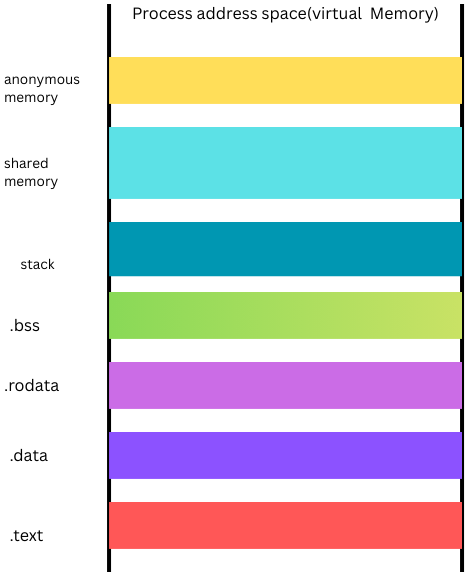
A memory map of the executable file’s code, called a text section.
A memory map of the executable file’s initialized global variables, called the data section.
A memory map of the executable file’s uninitialized global variables, called the bss section.
A memory map for the process’s user space stack.
An additional text, data and bss section for each of the shared library( such as glibc, dynamic linker etc) loaded into the process’s address space.
Any memory mapped files.
Any shared memory segments(ipc related).
Any anonymous memory mappings, such as those associated with malloc().
Virtual memory areas
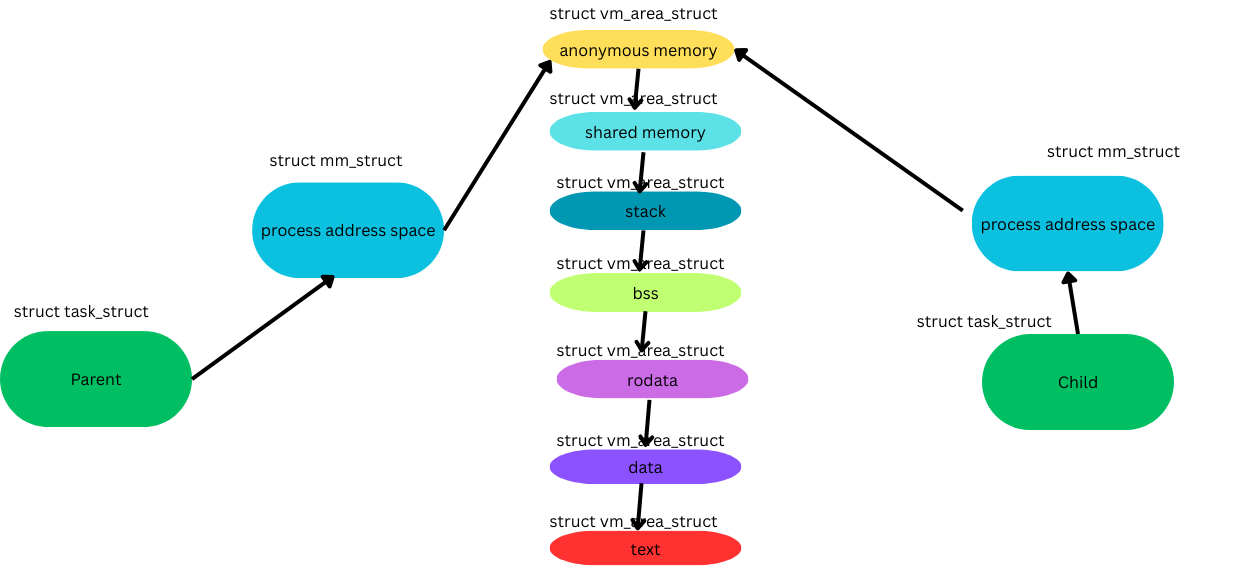
Each of the color coded segment in the above process address space is called a virtual memory area(VMA). This is represented by a data structure called vm_area_struct, which is defined in the file ./linux/mm_types.h.
The above process address space may look like below with VMAs
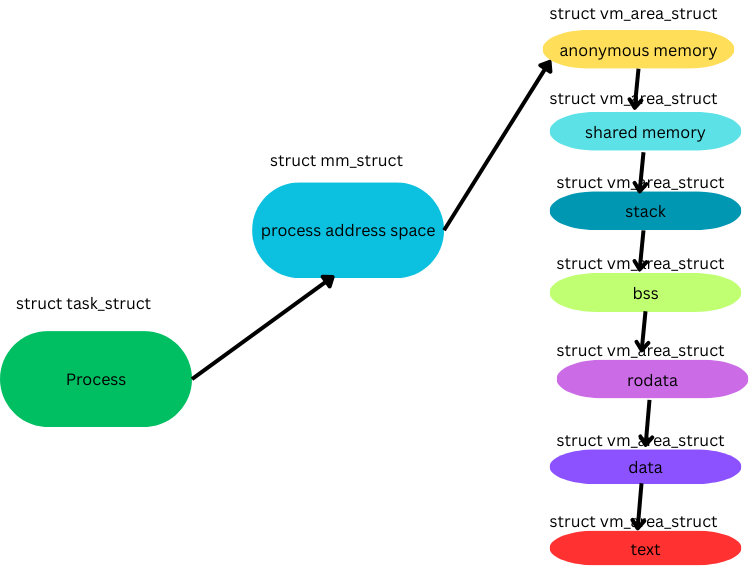
Programmatically, each process is represented by a data structure of type ‘struct task_struct’. This data structure has a field called ‘struct mm_struct’ which maintains a linked list of type ‘struct vm_area_struct’.
Each of the VMA has a start address (vm_start) and ending address(vm_end). All the address ranges being held by the process are virtual in nature. We will learn later that each of the VMA points to the physical memory through pages.
System calls like mmap(), mmap2(), do_mmap() can be used to add VMAs. System calls like munmap() and do_munmap() can be used to remove them.
More about memory management will be covered in another blog
Process address space in real life…
Let’s create some simple and sample programs and check practically how the process address space looks like by running some commands.
Commands
A program with no global, static or local variables. I am using C but the program language shouldn’t matter.
 #include<unistd.h>

 int main(int argc, char *argv[]) {
   # without this sleep() command, the process doesnt persists for
   # enough time to get the details
   sleep(100);
   return 0;
 }
The process address space is as below. The memory range may be different each time. Also, the memory ranges may not be contiguous, as the kernel assigns the memory as per the availability.
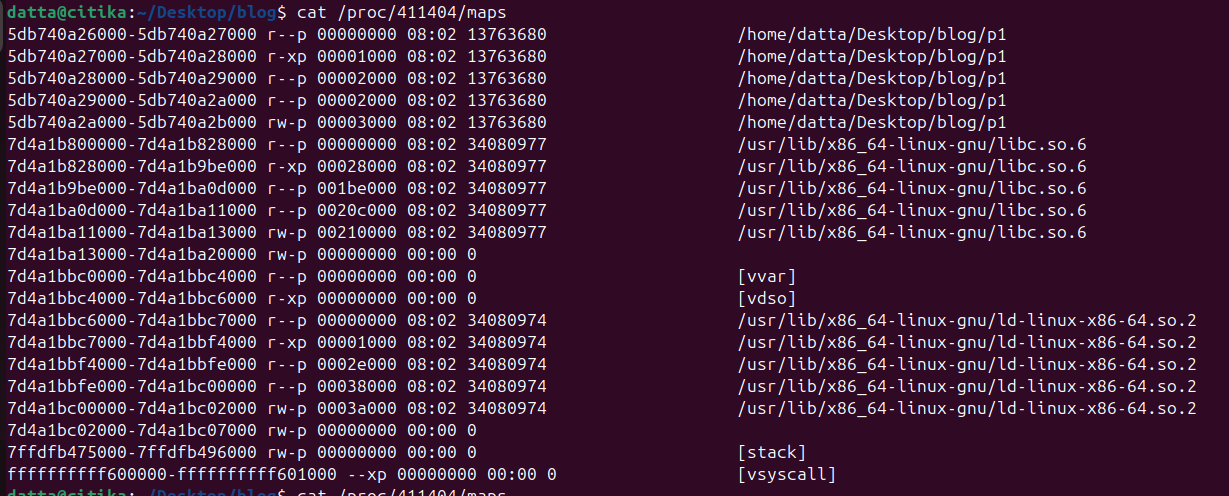
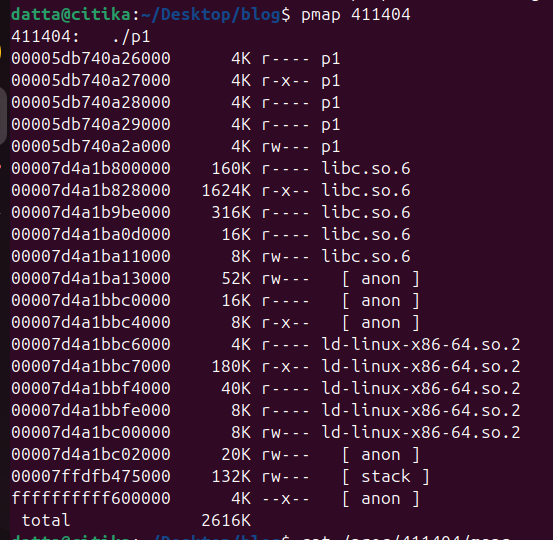
Let’s try to understand what each of the above attributes mean:
[vdso]: Virtual Dynamically Linked Shared Objects. This is a mechanism through which the interaction between the user space and kernel space is optimized for better performance.
[vsyscall]: This is a static allocation (each process uses the same vma), used to optimize the system call performance. The output of the system call is stored here for future reference. Very similar to cache used in other places.
[vvar]: Not much information is available about this vma.
[stack]: This vma is the user space stack. We have read and write permissions on this vma.
[ anon ]: vma for anonymous memory. This memory is usually assigned to the process by the kernel which is not backed by a file on the file system. Mostly for internal purposes.
[libc.so.6]: This is the C library(glibc), which is required to interpret the code.There are 5 entries, as below:
r——: This is a vma of type ‘rodata’(read only) for the C library(libc.so.6)
r-x—: This is a vma with read and execute permissions, meaning this hold the actual code of text of libc.so.6
r——: Another ‘rodata’ vma
r——: Another ‘rodata’ vma
rw—-: A read and write vma(rwdata) for the variables which allows reads and writes.
[ld-linux-x86-64.so.2]: This is a dynamic linker which is required to link the code with other shared libraries. We have similar ‘rodata ‘and ‘rwdata’ vmas for this library, similar to glibc.
[p1]: This is my actual C code file name. Kernel has assigned 5 vma’s for this code too, similar to above entries.
As you might have noted, a minimum of 4K has been assigned for each vma. This is the page size on my machine. All the memory assignments are in multiples of this pagesize.

Also, a total of 2616K (2.6 MB) has been assigned even to a simple program like this.
Process address map for all the below scenarios were same as above.
A program with an uninitialized global variable.
A program with initialized or uninitialized local variables.
A program with static variables.
This means that the kernel assigns a minimum of one page size memory to each vma irrespective of whether the program needs it or not.
A program makes a call to malloc() for dynamic memory allocation.
 #include<unistd.h>
 #include<cstdlib>
 #include<cstring>

 struct emp_det {
         long emp_id;
         char name[100];
 };

 int main(int argc, char *argv[]) {
   struct emp_det* ep = (struct emp_det *)malloc(sizeof(struct emp_det));
   ep->emp_id = 1234;
   strcpy(ep->name, "citika");

   sleep(100);
   return 0;
 }
The process address space in this case as shown below:
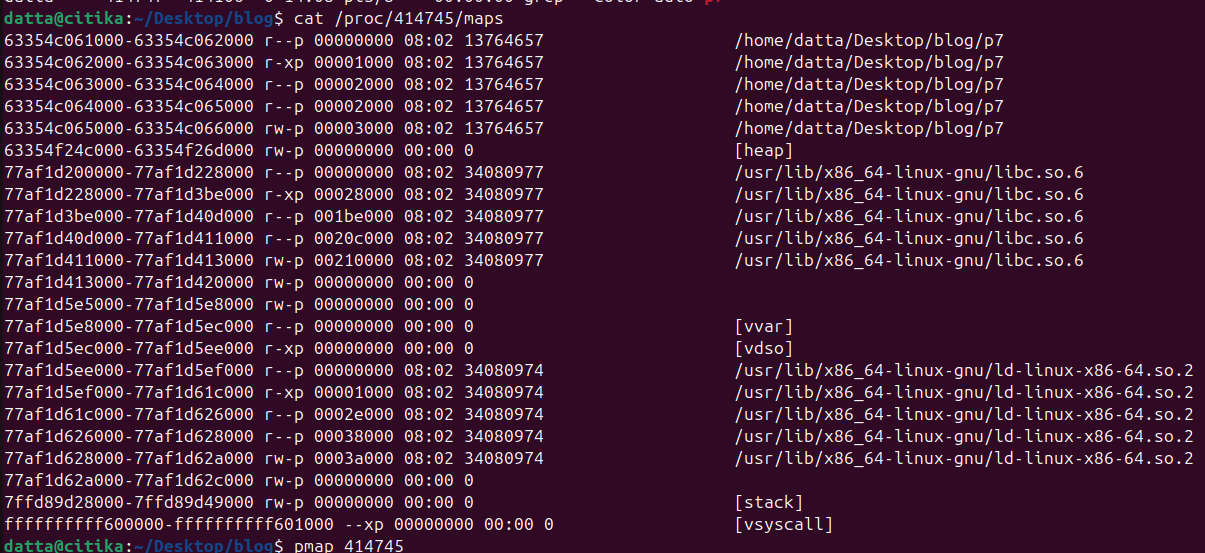
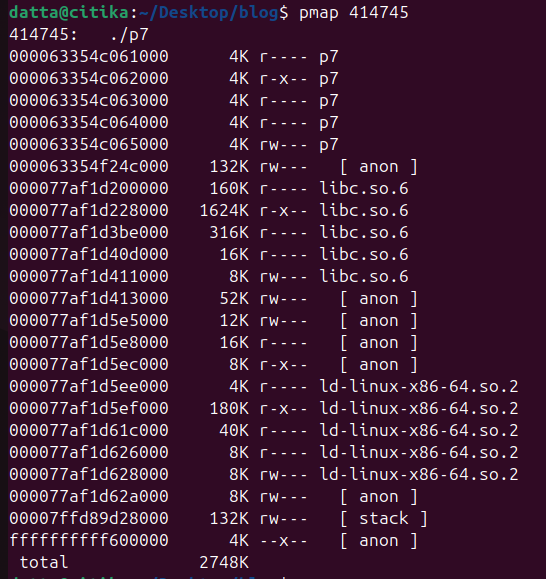
As you can see, there is an extra 132K of memory assignment to a [heap] region. This is for the dynamic allotments for the call to malloc().
Two processes which are running the same code.
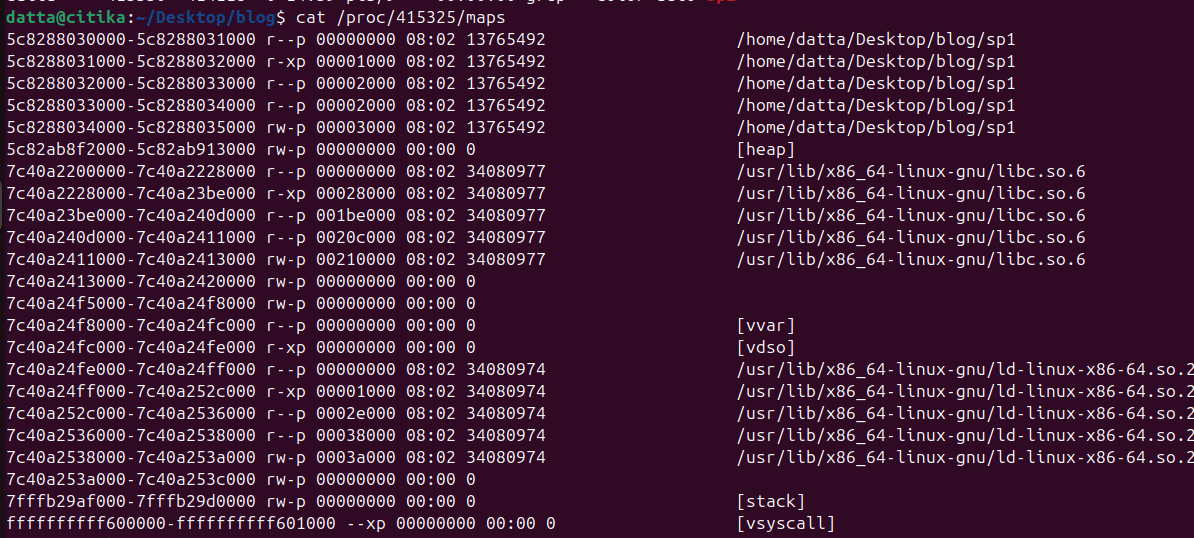
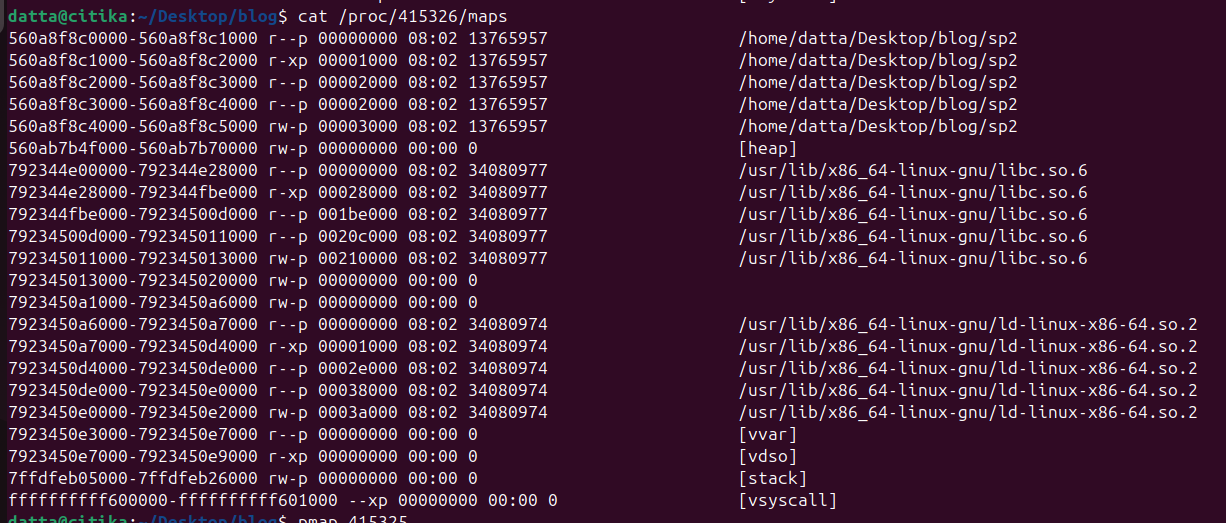
Both the process address maps look similar. Also, note that though they use the same glibc and linker’s, they are mapped to different vmas. This is an interesting finding, as the expectation was all the processes which use the same shared libraries point to the same memory areas.
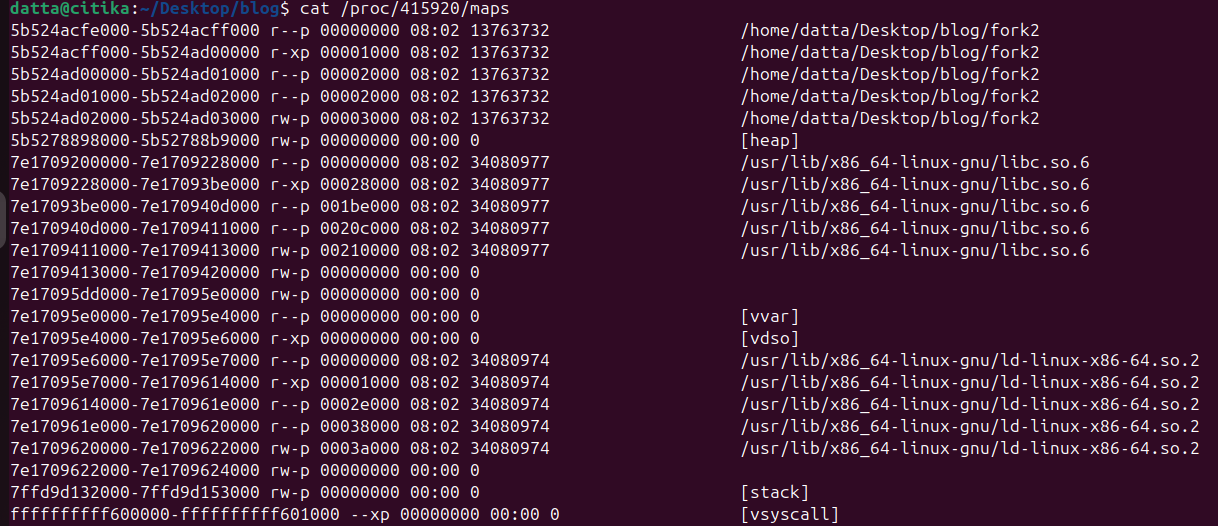
A child process created using the fork() system call. The goal is to check the process memory space for both the child and parent.
 #include <stdio.h>
 #include <unistd.h>
 #include <sys/types.h>
 #include <sys/wait.h>

 int main() {
     pid_t pid = fork();

     if (pid < 0) {
         // fork() failed
         perror("fork failed");
         return 1;
     }
     else if (pid == 0) {
         // Child process
         printf("Child process: PID = %d, Parent PID = %d\n",
                getpid(), getppid());

         // Simulate some work
         sleep(100);

         printf("Child exiting...\n");
     }
     else {
         // Parent process
         printf("Parent process: PID = %d, waiting for child PID = %d\n",
                getpid(), pid);

         int status;
         wait(&status);   // Wait for child to finish

         printf("Parent: child exited with status %d\n", WEXITSTATUS(status));
     }

     return 0;
 }
Process address map of the parent is:
Process address map of the child is:
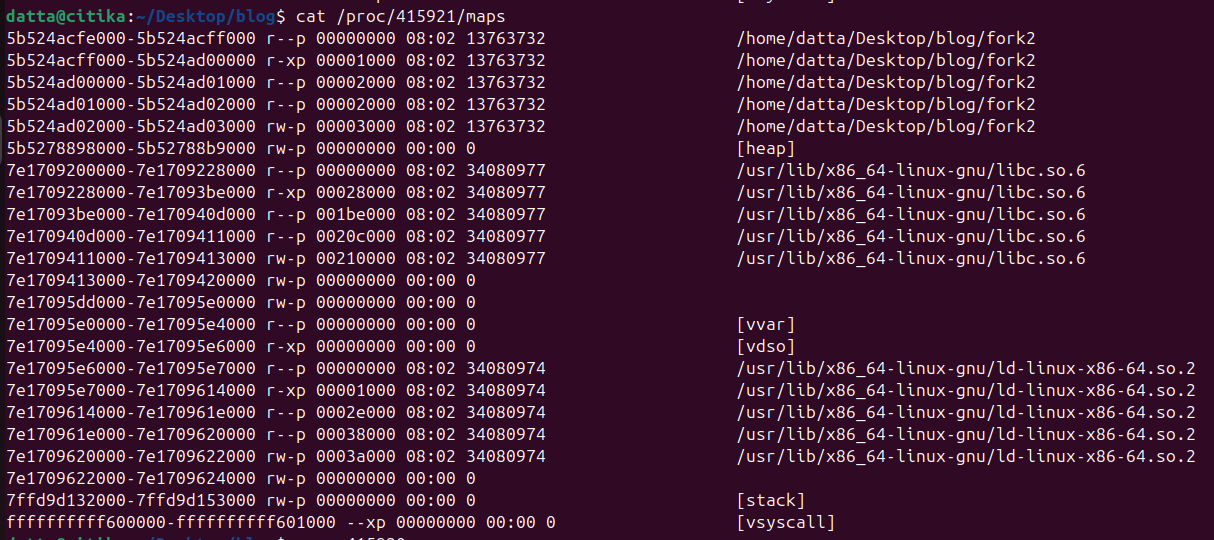
As you see, the parent and child are sharing the same process address space.
This is as per the design technique called Copy-On-Write(CoW) in which the kernel delays assigning the child to new address space until it is required. In this case, child process was not doing anything and hence was sharing the parent address space. This technique allows faster process execution.
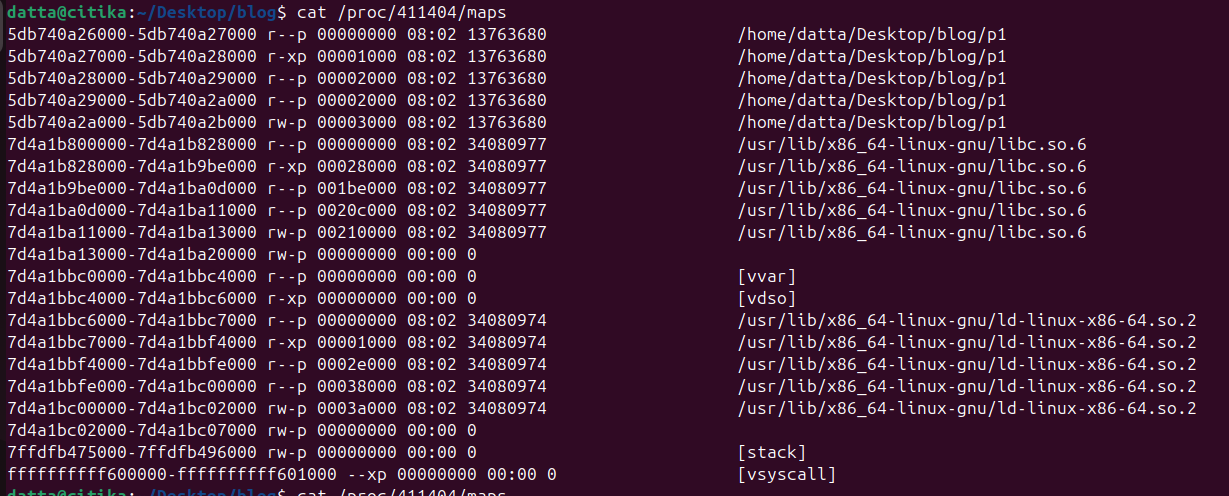
Let’s see a case where a child process is created and executes a new program. Here we are making the child process run ‘ls’ program.
#include <stdio.h>
#include <unistd.h>
#include <sys/types.h>
#include <sys/wait.h>

int main() {
    pid_t pid = fork();

    if (pid < 0) {
        perror("fork failed");
        return 1;
    }
    else if (pid == 0) {
        // Child process
        printf("Child: PID = %d, Parent PID = %d\n", getpid(), getppid());
        printf("Child: sleeping for 100 seconds inside exec...\n");

        // exec: run "sleep 100; ls -l"
        execl("/bin/sh", "sh", "-c", "sleep 100; ls -l", NULL);

        // Only reached if exec fails
        perror("exec failed");
        return 1;
    }
    else {
        // Parent process
        printf("Parent: PID = %d, Child PID = %d\n", getpid(), pid);
        printf("Parent: waiting for child to finish...\n");

        int status;
        wait(&status);

        printf("Parent: child exited with status %d\n", WEXITSTATUS(status));
    }

    return 0;
}
The parent process address map is as shown below:
The child process address map is as shown below:
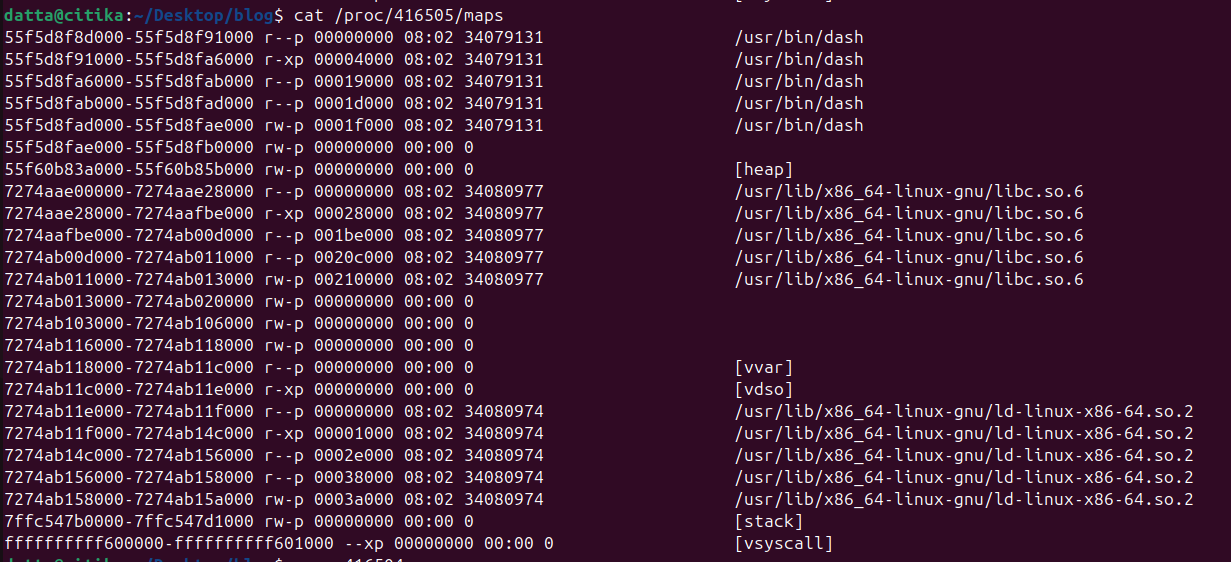
As you can see, both parent and child are using different process address spaces.
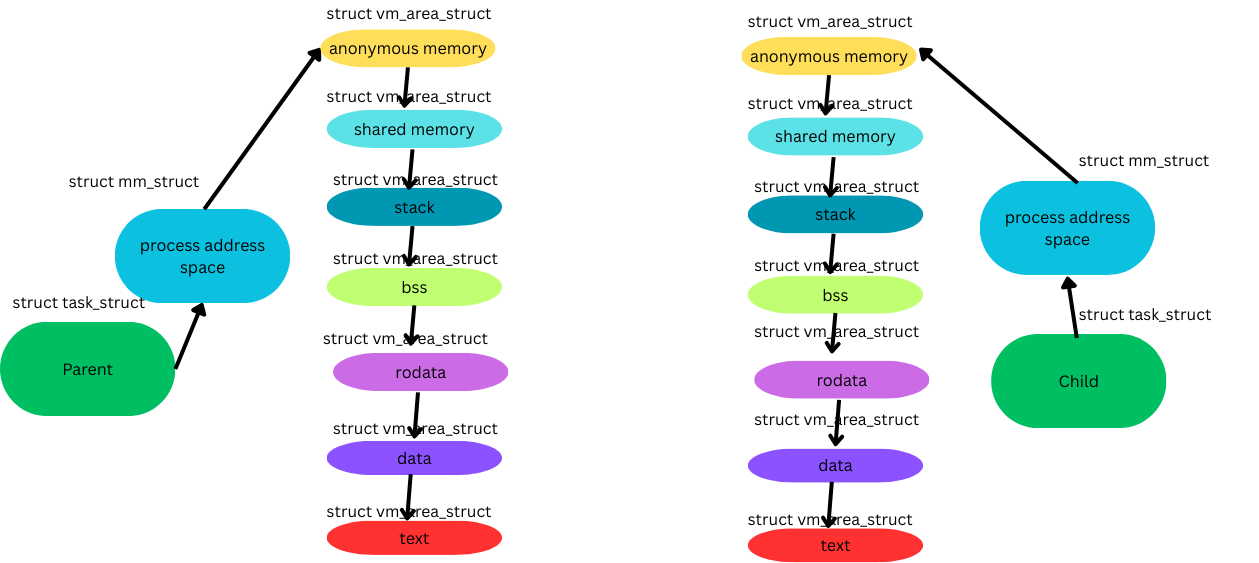
Again, its CoW feature working behind the scenes.
Process Termination
A Process is terminated in the below ways:
A voluntary termination when the process calls exit() call or just a ‘return’ statement.
An involuntary termination happens when the process receives a signal or exception which it cannot handle or ignore.
When a process exits, a series of actions happen, which might be the reverse of the actions during the process creation. Process runs do_exit() call which takes care of the process termination.
Set the PF_EXITING flag in the flags member of task_struct.
Call del_timer_sync() to remove any kernel timers, which might have been activated for this process.
Flush out the accounting information, when it is set.
Calls the exit_mm() to release the mm_struct held by the process. If no other process is using this address space, then release the memory from the slab cache.
Calls exit_sem(), to release any IPC related semaphore’s from the waiting queues.
Calls exit_files() and exit_fs() to decrement the usage count of the objects related to file descriptors and file system data. If this count is zero, then remove the entries from the slab cache too.
Set the exit_code in the task_struct construct as volunteered by the exit process.
Calls exit_notify() to send signals to the parent process. This process children are de-parented to any other process in the same thread group or to the init process. The exit_state in the task_struct is set to EXIT_ZOMBIE.
Send communication to the scheduler to schedule another process. This happens as the final step in the do_exit() and this call never returns.
At this stage, the process is not in runnable state and doesn’t have any process address space of its own and is in EXIT_ZOMBIE state. The only memory associated is with the task_struct, thread_info in the slab cache. This memory exists so that the parent process can claim some information out of it. Once this is completed, the slab cache is freed too.
A process becomes zombie, when its parent tries to clear the process table of the dead child(alive parent and dead child).
A process becomes orphan when its parent is dead and is being re-parented(dead parent and alive child).